Friday, June 5, 2015

Can Media Companies Still Charge Readers For Their Content?

brick-wall.jpg

In a web environment where majority of respected publishers offer content for free, many media companies find themselves facing unfortunate economic realities. Incentivizing subscriptions and maintaining a paywall has become increasingly difficult; consumers are flocking to free sources of premium content, leaving publishers with a core of loyal customers and few new prospects.

Fortunately, there are still ways for savvy marketing and content strategies to increase paywall subscriptions for digital publishers and allow top-notch content to continue generating revenue. We’ll get to those, but first, let’s consider the challenges facing the industry.

Challenges Publishers Will Have to Overcome in 2015

  • More Competition for Web Traffic – Optimized websites of yesterday are digital pariahs today—many of the best developed sites on the web have seen huge reductions in traffic as they fail to adapt.
  • Readers Less Willing to Pay - This is of course the ‘big one’ to tackle, but also relatively easy to challenge: Offering unique, interesting content and building intimate, effective relationships with your consumers will still increase paywall subscriptions for digital publishers.
  • Reduced Advertiser Interest -Publishers looking to profit should carefully consider what they can offer to advertisers—and more importantly, what they can prove they can offer to advertisers. For example, estimated impressions are good, but actual campaign ROI is better.
  • Old Strategies are Failing to Deliver - Old systems aren’t performing as well as they did in years past. Email databases produced from purchased lists and other decaying methods continue to lose profit potential, while effective SEO and back linking tools no longer work in the wake of Google algorithm changes, and securing your content becomes ever more difficult.

(Download our Free Ebook on How To Increase Paywall Subscribers With Inbound Marketing)

Thinking Like a Marketer

Before you bury yourself in the technical details of the processes behind driving paywall subscriptions, take a moment to put on your ‘marketing’ hat. Publishers that can’t think as marketers in their development of content, website design, campaign planning, etc., will have a steep uphill battle to win over new customers.

Your audience will almost certainly be smaller than that of sites offering free content, which means you must profit more efficiently from those consumers. By focusing on what your reader wants instead of what you're selling, you'll better position yourself as a premium content provider. Site behavior, along with demographic and psychographic insights can be used to glean this insight and guide you in creating and targeting your content offers.

Refining Your Audience Development Strategy

To continue thriving as a paid-subscription publishing site, media companies can find refuge in utilizing inbound marketing best practices in combination with a modernized audience development strategy. Once you know what your customer wants, the next step is figuring out how to translate those needs into content offers that eventually drive subscriptions.

Refine your content, tailor your campaigns, and thus develop an audience prepared to spend as you want them to. Segment your readers and approach those segments with targeted content offers that move users along their buyers’ journeys. Time, money, or any other resources spent on generic monetization strategies are often fruitless efforts—high traffic, low conversion means wasted profits.

By building a system of SEO-optimized landing pages, email marketing, social media outreach, etc., all designed to funnel qualified consumers into your publication network and into a position to spend, you can provide:

  • Yourself with a captivated audience.
  • Advertisers with a high-value market to work with.
  • Consumers with content they’ll love to pay for.

Building a Relationship

It bears restating in unambiguous terms: Your relationship with your consumers is the only thing keeping them from leaving your site for one with free content. Even excellent content will lose attention if you take actions that harm your consumer relationships. This is why we need to focus on quality editorial, website usability, and inbound marketing systems that develop relationships in a manner not unlike a well-trained sales rep working a potential customer.

Think of initial free offers as a “try-before-you-buy” experience, in which you’re given a change to prove your publication worthy of your readers’ dollars.

Crunching the Numbers

Once you have your campaigns in place and sales pipeline full, its important that you have the tools at hand to observe, analyze, and refine your efforts. To increase conversion rates, see where people are dropping off throughout your campaign, then drill into what is causing those leaks in your funnel.

Web analytics ranging from page views to conversion rates to customer satisfaction reports all deserve attention—and the more hard data you can develop on site performance and audience behavior, the better you can appeal to advertisers and other secondary monetization schemes beyond your paywall.

Final Thoughts

Ultimately, for publishers looking to increase paywall subscriptions in 2015, there’s no real ‘secret’ to reveal. Sound inbound marketing efforts, high quality content, and maintaining relationships with a focused customer base isn’t complicated, but it takes work. Stick with it, and you’ll reap the profits others have lost.

participate in the state of inbound publishing report

The Top 100 U.K. Business Blogs: How Does Yours Rank? [Free Tool]

InboundRank_blogheader.png

Wondering how your business blog ranks among the best in the U.K.? Would you like to know what parameters are preventing you from being number one? Do you know what the best blogs are doing to be number one? Looking for a list of the top 100 U.K. business blogs that you can add to your reading list or pull inspiration from?

If you're wondering about any of the questions above, then you’re going to love the update to our InboundRank tool, which is tailored specifically to U.K. marketers running business-related blogs. In addition to marketing, InboundRank is now open to the following categories: finance, software & tech, and general business.

How InboundRank Works

So you might wonder -- how was this tool built, and how does it work?

InboundRank uses three awesome APIs: SimilarWeb, Moz, and Buzzsumo. The SimilarWeb API pulls web traffic data and blog categorisations; the Moz API pulls domain authority; and the Buzzsumo API pulls average social shares. Together, numbers from these APIs are used to calculate your InboundRank score -- the closer you are to 100, the higher you'll rank.

How You Can Use InboundRank

You can use the tool in six ways.

1) Rank your own business blog.

To rank your own blog, all you need to do is enter your email address and URL and click the "Rank" button -- it couldn’t be simpler.

After you click "Rank," you’ll receive your rank.

2) Add to your following/reading list.

If you’re looking for some new, quality blogs to follow, InboundRank is a great place to find them.

(P.S. Click “Close Contenders” at the end of the list and you’ll get a further list of 50 sites which are moving towards the top 100 -- and this will grow as more sites are ranked.)

3) Find your competitors.

If you run a business-related blog, this place is a great place to go to figure out who your competitors are. Competitor intelligence is a great asset to have on your side when developing content strategies, and can even help to inform your targeting strategies when it comes to paid advertising.

4) Find guest post opportunities.

Looking for great blogs for guest posting? No problem! InboundRank provides a ready-made list of the best business blogs in the U.K. Have a look through the list, find a blog that aligns with your brand, and reach out!

5) Build an influencer list.

Sometimes when you are building out an influencer list, it can be difficult to know where to start. This list can be a great starting point.

6) Benchmark your progress.

Once you get a ranking for your blog, you can concentrate on improving your ranking and moving up the list by doing one of three things -- increasing your traffic, your domain authority, or your social shares.

Ready to rank your business blog? Click here if you are -- and don’t forget to share your ranking on Twitter. :)

twitter-logo Click to Tweet:

"Rank your #business #blog using @HubSpot's latest version of #InboundRank: http://www.inboundrank.co.uk/"

Twitter-WhatsYourRank.png

Editor's Note: This post was originally published in March 2015 and has been updated to be more accurate.

rank your business blog in the uk

Thursday, June 4, 2015

5 Simple Ways to Segment Your Social Media Audience

segment-social-media.png

"How can I get more leads from social media?"

This is a question I get often from marketers who are struggling to find and prove the value of social media to their business. Generally, it's followed by an explanation of the various social media tactics they have tried to address this concern. Maybe they'll publish more often or change up the type of content they share. Maybe they'll engage with industry experts on the platform. They might even try hosting a live chat or event.

The one thing most of them aren't doing? Segmenting their audience on social media.

Segmentation is not a new concept for marketers. We use segmentation to send emails, create pricing models, and understand the behaviors of our most loyal buyers -- so why aren’t we applying this practice to social media?

To get some ideas for ways you can use segmentation in your social media strategy, keep on reading.

1) Use social media targeting.

When most people think of social media segmentation, they think of paid targeting options. Facebook allows businesses to target their messages to users based on data such as user demographics, interests, and geographical location. Other platforms including Twitter, LinkedIn, and Instagram have followed suit. Paid targeting is effective because it enables companies to get a specific message in front of a specific audience.

Lucky for budget-minded marketers, there are also some organic targeting options. Below are ways you could make use of both organic and paid targeting tactics.

Organic

Organic targeting allows users to tailor their content to specific audiences without paying to promote a post. Facebook, LinkedIn, and Google+ make it easy for companies to do organic targeting.

Facebook

Facebook allows you to filter by gender, relationship status, age, location, interests and more. Simply create your post and select the target audience of your choice.

hubspot_facebook_page

LinkedIn

LinkedIn allows you to target by industry, company size, function and more. This is a a great feature for B2B companies that are seeking to attract more visitors.

Google+

You can also select a specific audience on Google+ by publishing your content to a select circle of friends (you will need manually add members to the circle).

Paid

Paid targeting enables companies to be seen by social media users who are already active users and more likely to engage your offer and campaign. As a result, companies can increase their reach, expand their audience size, and achieve more quality conversions.

Almost all the social networks allow you to create targeted paid campaigns. Below is an example from Facebook -- you can target posts by gender, age, behavior, location and more.

2) Create a group.

Social media is all about community. Building communities of people who share common interests is an easy way to segment your audience and gain valuable insights. You may decide to keep the group open (anyone can join) or closed (new members must be approved by a moderator) -- there are advantages to each.

Open groups enable you to gather information about how a more general audience feels about your brand. You can use this forum to have discussions and ask open-ended questions such as, “What are your biggest challenges?” or “What makes excellent customer service?” You can also test out new ideas with your audience members or discover new content ideas that they would find interesting and relevant. The advantage here is that you will have a large group to bounce ideas off of. The disadvantage? They may not be as knowledgeable about your industry as you need.

That's where closed groups can come in handy. Because you are approving each member's admission to the group, you can cherry-pick the most qualified candidates. Maybe they're a group of customers whose opinions you value, or list of people who have attended an even you've hosted. Regardless of what the requirements of admission, this can be a great way to get specific, helpful feedback from a group you trust -- but you may not get as many responses as an open group discussion.

3) Make a list.

Most marketers are familiar with creating lists -- we do that every time we send a new email campaign.

But did you know you can use lists to have more productive social media conversations? Social networks like Facebook and Twitter allow users to create lists of friends, followers, people who have attended an event, and more.

If you're a HubSpot customer, the lists you use for your email can actually be one and the same as your social monitoring lists. (If you're curious about how to create one, check out this Academy help document.) This means that you could set up a stream for each of your buyer personas, a stream for leads who are talking about your brand, or customers in a certain industry. You'll spend much less time trying to filter through the noise, and much more time having relevant, targeted conversations.

4) Post at different times of the day.

We’ve all heard how important timing is to marketing, especially on social media. If you have a global following, you should be publishing posts throughout the day at the times most appropriate for different geographic regions. Differentiating your publishing times allows you to get engagement from a larger portion of your audience. Additionally, publishing a message more than once or at different times of the day can help your reach a specific audience that you haven't reached before.

5) Maintain multiple social media accounts on each network.

As you become a better marketer and master ways to segment your audience, more and more people from all over the world are going to be interested in connecting with you through social media. At that point, you may find that the best way to consistently serve your audience relevant content is by setting up several social media accounts, each with a specific bent.

At HubSpot, we maintain more than five different Twitter accounts to provide content that is relevant to each segment of our audience. For example, @HubSpotAcademy is a channel that inbound marketers can use in order to learn how to be a better inbound marketer, while @HubSpotSupport is a channel that our customers can use to get help using the HubSpot platform. Both Twitter accounts are relevant to anyone interested in HubSpot, but they are most relevant to their particular segments.

Keep in mind that each social media account should still serve a larger audience, so be sure to work on building your overall audience from one account before you try building out more. Also, if you decide to start building out more accounts, be sure that people can easily differentiate their purpose (ex: customer support, marketing materials, your yearly event, etc.) -- otherwise, you'll be creating more work for yourself.

So there you have it, five ways to segment your social media audience for more relevant conversations -- and eventually, more conversions.

How else do you segment your social media audience?

get certified in inbound marketing

Wednesday, June 3, 2015

The Art and Science of Driving Webinar Registration

art-science-webinar.png

I often poll marketing audiences about their biggest webinar challenges. Almost every time, I hear that their biggest challenge is on driving registration -- in a recent poll, we found that 42.9% of respondents had the biggest trouble with getting people to register for their online event.

Why is driving webinar registration such a challenge for marketers?

Perhaps the biggest explanation for this issue is the fact that our prospects are now busier than ever, making it very hard for them to take the time to tune in at certain day at a certain time. They're also bombarded with tons promotional emails, making them wary of any kind of advertising -- social or otherwise.

So how can we get them to sign up for our webinars if we can’t even get them to read emails promoting them? The key is catching your target audience at a moment of receptivity with a message that resonates -- it's both an art and a science.

The Science of Getting People to Register for Webinars

As marketers, we rely too often on a static process to promote our events: a single email (sent multiple times) and perhaps a few tweets with the name of the event and a link. Depending on your brand and the appeal of the subject matter, this may be enough to capture a sufficient audience, but it certainly leaves a lot of prospective leads behind.

Truly innovative marketers are now experimenting with the process of promoting their events. This includes sending out emails at the right time, promoting different types of emails (HTML, plain text and hybrid -- and with embedded videos, for example), experimenting with drop schedules and timing, and mixing up social promotions with different messages and types of outreach.

1) Send your promotional emails at the right time.

Though the best time of day and day of week to send emails depends on your business, industry, and audience's behavior, it's helpful to get an idea of when your emails are most likely to succeed (and time your sends accordingly). In our annual benchmark report that analyses thousands of webinars hosted by our customers, we found out the optimal times for sending your emails are:

best_promo_days_emails.png

2) Extend the promotional period to drop more emails.

When you look at industry best practices for when people actually sign up for webinars, there is an enormous percentage of people who sign up more than seven days before the event -- as many as 36% of sign-ups will take place more than a week out. As a result, make sure you give yourself enough time to promote the event (beyond a week) in order to improve your results.

promo_cycle.png

3) Mix up email types.

Doing different types of emails in different drops is typically a very successful approach. One flow I typically recommend is to send an HTML two weeks out, a plain text email seven days out, and then an HTML email again on the day of the event. This can give the impression that the event is much larger and more significant than it first appears. This process also makes it more likely that your recipients will read one of the emails since one is different from the others in the campaign.

email_mark.png

email_html.png

4) Mix up promotional messaging.

This is similar to the previous tip, but instead of email format, we’re referring to the readable content itself. While you may be delivering the same message, changing up the tone and verbiage can help cut through the noise. You might try taking a more personal tone with your messaging in one message, but keep to a more formal tone with others.

The Art of Promotional Content

The art of driving webinar registration comes in how we design our promotional content. For many companies, all of the creative energy gets put into the webinar presentation, not the invitations. This leads to the classic “If a tree falls in the forest …” dilemma. Your content doesn’t exist if no one knows about it.

Writing compelling promotional content is the first exposure your prospects will have to your message. It’s the doorway to your webinar. To make sure you're creating compelling promotional copy, make sure your writing has at least one of the following elements:

1) Upsets the status quo.

Great promotional material is always going to galvanize action from the recipient, and an easy way to do this is to deliver content with a headline that stops people in their tracks. If your material tells audiences what they expect or already understand, it’s easily glossed over. But a contrarian headline or lead sentence can snag the interest of a recipient. For example, a webinar touting the title “Big Data as We Know It Is Dead” is sure to garner interest. Just be sure that the content of your webinar actually delivers on that headline -- otherwise you could alienate the registrants you worked so hard to earn.

2) Promises change.

In this case, we’re again referring to the lead or headline of your promotional material. Succinctly, you need to articulate exactly what prospective attendees will be able to accomplish once they’ve attended your webinar. How much will they save? What will they achieve? How will their lives or businesses be better? If you can deliver this message in a brief format, more people will be likely to attend your event.

3) Challenges common beliefs.

While this may seem similar to “Upsets the status quo,” there are subtle differences, primarily related to phrasing. Challenging common beliefs means posing a question related to the recipients’ day-to-day experiences that challenges them to re-think a foregone conclusion. “Do you really need analytics to be a successful marketer?” would be a question that might make a recipient stop and wonder what an event is all about.

4) Titillates.

The pure definition of “titillate” is to “excite agreeably,” and this can be an effective strategy, provided that it’s combined with substantive information that will further compel the recipient to attend your webinar. Perhaps this may take the form of a preview or teaser of the event, so your audience gets a sense of what to expect from the event itself. One approach is to provide background on the expertise of the speakers and/or presenters who will be running the event.

5) Addresses known pain points or needs.

This may appear obvious, but for many promotional materials, a clean, clear description of how you’re going to address a common problem is the most effective means of getting recipients to pay attention. If a target spends all day trying to install X and then sees a webinar that says “How to Install X Three Times Faster,” that person is going to consider that event carefully.

Successful webinar promotions artfully and strategically capture people’s attention, whether it’s through a subject line that threatens the status quo, an opening email sentence that promises change, or a tweet that spurs the imagination. As marketers we have to be just as creative promoting our events as we are delivering them. It’s a little bit art, and it’s a little bit science, but mostly it’s just great marketing.

Want to learn more about promoting webinars? Our recent master class hosted by Mark Bornstein of ON24 and Lisa Toner of HubSpot is available on demand: http://hubs.ly/y0K6Vq0

webinar checklist

85% of Marketers Fail to Reach SlideShare’s Gigantic Audience

There’s a greater than 4-to-1 chance you’re missing out on a gigantic opportunity to put your content in the path of your prospects.

See, according to the new Social Media Marketing Industry Report, 85% of marketers don’t use SlideShare. Here’s the data.

most-marketers-dont-use-slideshare

In the report, Social Media Examiner’s Michael Stelzner writes, “Facebook, Twitter, LinkedIn, Google+, YouTube, Pinterest and Instagram were the top seven platforms used by marketers, with Facebook leading the pack by a long shot. All of the other platforms paled in comparison to these top seven.”

The reality is SlideShare is misunderstood

I suppose one could define a social media platform various ways. Like the seven networks outperforming it in terms of use, SlideShare is a site where you can publish and share content. However, unlike most of them, discussion and interaction between members is nearly non-existent.

slideshare-is-a-global-hub

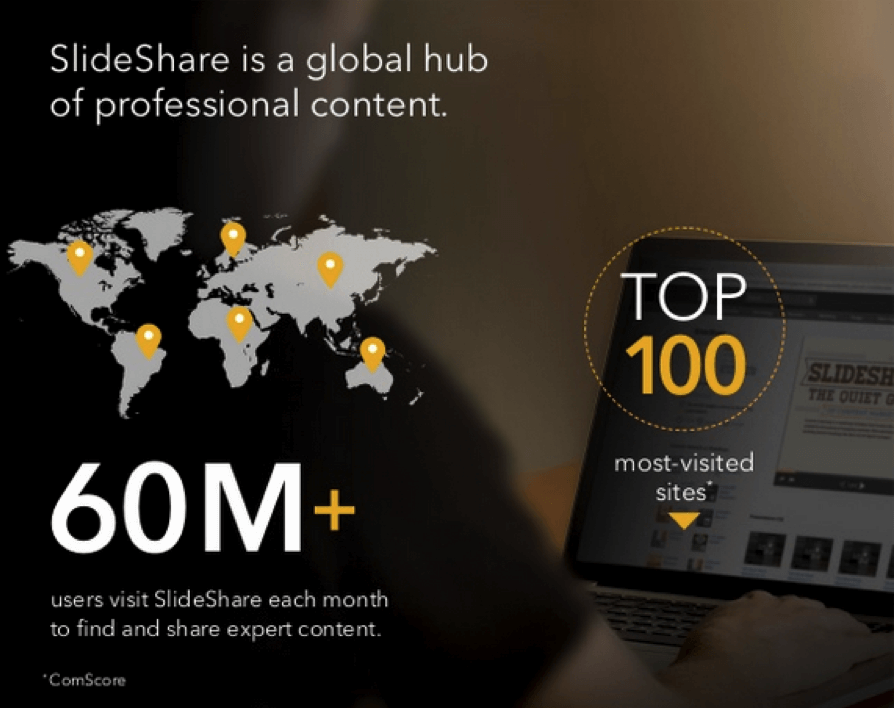
SlideShare describes itself as a global hub of professional content. In this realm, it ranks alone at the top. Just as YouTube’s focus is to democratize video, SlideShare’s is to do the same for presentations. Unlike YouTube—and more like LinkedIn (which owns SlideShare)—SlideShare targets business users.

SlideShare’s audience is bigger than you might think, is terrific for lead generation, and is populated by people actively seeking information and resources (not dissimilar from a search engine, in that regard). And that audience is hungry for information. ~ Jay Baer, author of “Youtility”

SlideShare traffic is driven largely by search and social. Over 70% come via direct search. Traffic from business owners is 4X greater than Facebook. Traffic is truly global. More than 50% are from outside the U.S.

As you see from the traffic numbers in the image above (from “Introduction to SlideShare for Business”), its reach is enormous. Still, in consulting with B2B clients daily, I often find myself the first one to introduce them to SlideShare.

I explain, “SlideShare gets 60-million visits per month. Your website or blog does not. You should be on it.” (All credit goes to Todd Wheatland, author of “The Marketers Guide to SlideShare,” for that one.)

Now I’ve explained it to you too. So we’ll move on to…

How to succeed on SlideShare

Though you can post a variety of formats on SlideShare, unsurprisingly, slideshows rule. But many make a mess on the site with an old-fashioned approach to presentations.

My friend, Doug Kessler of Velocity Partners, who created one of the biggest hits SlideShare has ever seen, explains:

“The best SlideShare presentations were created for SlideShare. SlideShare is not where shitty presentations go to die. It’s a powerful, linear, visual storytelling medium in itself. Write stories in short chunks that make people keep clicking.”

Doug means if you create a graph-happy deck and sprinkle in flow charts, tables, callouts and starbursts, you have yourself a stinker. The formula success is to:

Tell a story — Your slides should “speak for themselves” and tell a story—much like a picture book. Use classic storytelling practices in a logical sequence with an obvious beginning, middle and end. Break longer works into chapters.

Keep it simple — Presentations are likely to be viewed quickly, often with limited screen space. Present your ideas in small bites using power words that pack a punch.

Make it beautiful — Successful presentations usually feature tasty graphics and design. Your first slide will be your click bait. Make it striking, professional and tastefully branded. Use powerful images, quality fonts and maintain a high degree of professionalism start to finish.

Here’s an introduction to SlideShare designed to school you fast on the language of SlideShare and its many features and benefits.

Getting featured on SlideShare

A number of presentations (and more) are featured on SlideShare’s home page each day. Though I have no way of knowing what percentage of visitors come by way of the home page, I’ve learned from experience when you’re featured there, views of your content take off far faster and multiply your chance for creating a big hit.

SlideShare editors curate the featured presentations including a daily top three. In the presentation above, they offer seven tips for increasing your chances of being selected. These are:

  • Write a powerful headline
  • Create an enticing cover slide
  • Be well designed (they wrote that, not me)
  • Keep us engaged through to the end
  • Fully communicate your message
  • Tackle a news-related or trending topic
  • Be trend-setting in terms of design, style or content

I put some effort into creating a rocking cover slide for this presentation, which earned a spot on the home page and has got nearly 50K views to date.

Ideas for your content

Have some fun — Like any good content, you need to demonstrate you understand your audience’s challenges and deliver helpful advice, but it helps to make it entertaining. A sense of humor makes your content more memorable.

Take risks — Presentations stand out when they’re provocative, bold, even edgy.

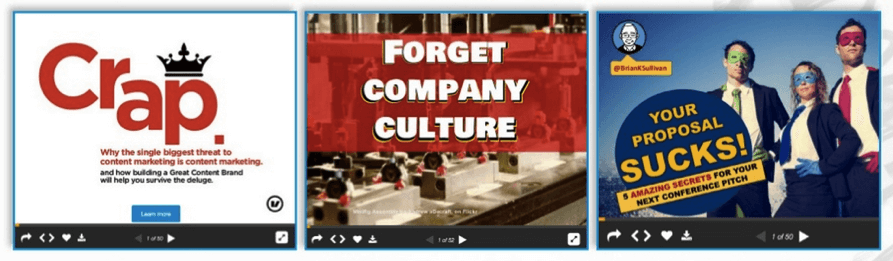
contrarian-titles-do-well-on-slideshare

Negative or contrarian titles, with some edge, often perform very well on SlideShare.

Be professional — If you lack writing or design talent, outsource to pros. If you want to create it yourself, secure the rights to strong photography, illustration and consider using professionally prepared templates.

Repurpose content — Mine your existing content and give it new life on SlideShare. A variety of content types (articles, eBooks, white papers, interviews, webinars, etc.) can be transformed into quality presentations for the SlideShare platform.

Show and tell — SlideShare lends itself nicely to mini case studies, testimonials, research findings and portfolio pieces.

Borrow authority — Highlight ideas from industry leaders to lend credibility to your presentations.

SlideShare created a “what to upload” page to help inspire ideas. The page features topics, formats and examples of each, including:

  • How to guides, tutorials
  • Travel features
  • Quotes, inspirational quotes
  • Trends
  • Visual resumes
  • Time management tips
  • Sports features
  • Photo collections
  • Portfolios
  • Investment advice
  • Recipes
  • Case studies

Note that while slideshows are the dominant content type, infographics are 4X more viral than presentations. Video doesn’t do well on its own, but video from YouTube can be added to slide decks, a very nice touch.

Getting discovered on SlideShare

Optimize for search — SlideShare has very high domain authority, so if optimized correctly, your presentations may rank high on searches.

a-to-z-guide-on-slideshare

Within a day of publishing “The A-to-Z Guide to SlideShare” I found my presentation ranking on the first page of a Google search for “guide to SlideShare.” Notice how my keywords appear in the title, URL, and snippet.

Help your prospects find your content by including keywords, based on your search engine optimization strategy, in the titles, descriptions, and tags of your SlideShare content. Your work is converted into transcripts, which are included on your pages, which may also help with search.

Share and encourage sharing—Quality SlideShare content often spreads virally through blogs and social networks.

  • When you share via the social media options offered your slideshows will be pictured in timelines and in some cases, embedded.
  • You can also send your content via email as attachments or links.
  • Embed code is provided so you can embed your content on WordPress blogs.
  • Grabbing embeddable code is an option for your viewers too, so you’ll find when you publish great content, it often appears on numerous websites.

Generate leads with SlideShare

Use SlideShare to generate traffic and leads. Remember, SlideShare users are usually doing research. Most arrive via search. Lead them to your website and/or find out who they are. Try any or all of the following tactics:

Include links — To generate traffic to your site, media outlets and landing pages, create links in your presentations. Design links as buttons to make it your call to actions obvious and clear and consider using arrows or “click here” instructions.

Provide contact information — In addition to buttons, include URLs and contact information at the end of your presentation. (If you allow, users have the option to download your content, so it may be accessed later.)

Promote your site — Include your URL on your profile page on in the descriptions of your presentations.

Insert a form — The option to include lead forms was once offered only via paid memberships. Today, all features are free.

You can insert customizable forms at various places in your presentation. Forms are customizable, so you can create fields and/or questions to better qualify leads. LinkedIn members can respond fast with an auto-fill feature.

If you like, you can even require viewers to complete the form in order to continue reading your presentation or to download it. (However, that can be annoying.)

get-updates-feldman

Most of my forms come prior to the final slide aiming to collect new subscribers to my email list.

Are you in?

Trust me, if you’re a serious content marketer you don’t want to be among the 85% that hold out from getting involved with SlideShare. The community presents an ideal place to incorporate a visual element into your content marketing.

At present, SlideShare is 100% free. Tune into what works on SlideShare. Try following the advice I’ve given you here to attract viewers to your content, expand your online reach and realize new opportunities to generate leads.

About the Author: Barry Feldman operates Feldman Creative and provides clients content marketing strategies that rock and creative that rolls. Barry has recently been named a Top 40 Digital Strategist by Online Marketing Institute and one of 25 Social Media Marketing Experts You Need to Know by LinkedIn. Visit Feldman Creative and his blog, The Point.

The Shark Tank Effect: How to Prepare Your Website for a Traffic Influx

prepare-website-traffic-influx.jpeg

Have you ever watched TV while simultaneously surfing the internet on your phone?

I do it all the time -- and my guess is that a lot of you do, too. Nowadays, the majority of American consumers own multiple internet-connect devices like high-definition TVs, smartphones, tablets, and computers, and Nielsen finds that it's fundamentally changing the way we watch television. We're using our phones, tablets, and laptops as "natural extensions of the programming [we] watch."

Of course, this is probably true for some shows more than others. I've found Game of Thrones requires my full attention, so I make a point of putting my devices away when I watch. But for shows like ABC's hit series Shark Tank, watching is an interactive, multi-screen experience for a lot of people.

Think about it: Shark Tank is a show featuring entrepreneurs who pitch their young businesses to investors. Many viewers watch it while simultaneously searching for and checking out those businesses online. So, on the day an episode airs, some percentage of the seven to ten million people watching will land on those businesses' websites.

Can you imagine the traffic influx these businesses receive -- and the damage it could do to their websites if they aren't prepared?

While the featured entrepreneurs can certainly be happy about the exposure, many of them actually struggle to prepare their businesses on the back-end for the huge increases in traffic, social media mentions, and sales. Many young businesses' websites aren't equipped to handle huge percentage increases in traffic. In fact, to the web servers, an increase this sudden can look like an attack. Slow load times are bad enough, but if your servers think your website's being attacked, your website could shut down entirely.

That was a big concern for business owners Brittany Hodak and Kim Kaupe when they heard they were going to be on Shark Tank for their superfan experience company ZinePak.

zinepak-shark-tank.jpg

Source: Inc.com

Their two biggest concerns were:

  1. How do we prepare our website so it doesn't slow down during (and after) the show's airing?
  2. How do we make sure our mobile website is fully responsive so that all those people looking us up on their phones have good experiences?

I had the chance to chat with Co-Founder Brittany Hodak about the sprint, as well as with Kevin Barber, founder of Lean Labs, the design agency that helped her prep on the back-end. Let's take a look at how they prepared ZinePak's website for the traffic boost.

Knowing the Stakes

Though the ZinePak founders filmed their Shark Tank episode last September, it didn't air until April 24, 2015 -- and they were given only three weeks notice of the air date. With a quick deadline looming, Hodak and Kaupe found themselves kicking into high gear.

They didn't just make a few tweaks to their website over the next few weeks. They ended up completely redesigning and rebuilding it -- homepage, landing pages, everything.

The first thing Hodak and Kaupe did? Research what kind of traffic influx to expect. They got their information from Shark Tank producers, news reports, and other business owners who'd previously appeared on the show.

"We read news reports on people who had 1,000-2,000% increases in traffic," says Hodak. "We had friends who were on the show who told us they were getting five to nine orders per minute for days after the show aired. We took the numbers everyone was giving us and decided to prepare for the highest one." One reason for this? Their episode happened to be airing right before the interview with U.S. Olympian Caitlyn Jenner (formerly known as Bruce) on her gender transition, which they knew would garner a huge live audience.

After hearing from friends and learning of other Shark Tank contestants (like CordaRoys) whose websites crashed or were difficult to navigate on a mobile device, Hodak made her website a top priority. An unresponsive, slow website is the last thing you want during one of the most important moments in your business' lifespan.

"When a successful, young entrepreneur puts herself out there on a very public forum, one of the most important things she's thinking about is whether the website's working," says Hodak. "If the website didn't work, that would've been a serious issue."

Finding the Right Partnership

It was important to Hodak and Kaupe to work with design and engineering professionals from the get-go so they didn't have to worry about trying and failing to tackle issues they didn't know much about.

"Kim and I are entrepreneurs," says Hodak. "We like to do what we're good at -- which is marketing, entertainment, and creative packaging, not understanding what back-end support goes into keeping a site going across however many servers given however much traffic."

The pair ended up looking at our service marketplace and hiring the HubSpot-certified web design agency Lean Labs.

Their to-do list with Lean Labs? Completely redesign, build, and launch their website in time for the airing of their Shark Tank episode.

The morning after Hodak first called Lean Labs to explain their situation, the agency presented her with the very first wireframe for their new website and a project plan. "It's really easy to burn a week on planning a project out," Lean Labs' Barber told me. "So [getting a project plan together] is the first key, especially if you have a tough time frame."

Here's how Lean Labs outlined the timeline:

  • Day 1: The first wireframe was delivered.
  • Day 3: A detailed project strategy was agreed upon.
  • Day 4: The first mockup was delivered.
  • Day 6: The portfolio mockup was delivered.
  • Day 8: All changes and revisions were loaded.
  • Day 12: The first version of all pages was presented.
  • Day 15: The final version (version 5) was delivered.
  • Day 17: Coded pages were delivered and approved.
  • Day 21: Key pages of the site were built.

"Normally, I do weekly huddles to keep clients on the same page," says Barber. "Sometimes twice a week. For this project, we met every single day. We got on GoToMeeting every afternoon to look at the day's progress."

It helped that Hodak and Kaupe knew what they wanted content-wise on their website thanks to having a deep understanding of their brand. They were able to provide the visuals without having to go through rounds of revisions, which made a design project that might've normally taken months fit into a much shorter time frame.

Now, let's take a look at how the ZinePak website was redesigned to withstand the traffic influx expected from Shark Tank.

How They Designed a Website to Withstand a Large Traffic Influx

Most companies preparing for a high-traffic event won't be in a position where they need to completely overhaul their website design, but there are some design tips that can apply to anyone preparing for a high traffic event. For ZinePak, a total redesign was a major part of the process -- and it actually gave them the advantage of being able to design the site specifically to handle high traffic.

If you're preparing for a traffic influx, the extent to which you prepare will depend on the robustness of your content management system. Full disclosure: ZinePak is a HubSpot customer. Because the HubSpot Content Optimization System can handle a lot of simultaneous traffic (1,000 requests per second or 3.6 million requests per hour), they were likely going to be okay. But, of course, everyone agreed that taking extra precautions could only help.

Here's some insight into how to design a website to handle large traffic influxes.

1) Used a good hosting platform to begin with.

It should go without saying: Don't expect a small hosting provider to be able to handle high-traffic events like a Shark Tank episode. These hosts might be able to do 15 requests per second before starting to run into issues. Instead, use a platform that's backed by a Content Delivery Network (CDN) for handling high traffic loads and easily routing traffic based on where your visitors are coming from.

2) Used high-quality images with compressed file sizes.

If you go to ZinePak's home page, you'll notice there are a lot of visuals. A simple design with large graphics, large and succinct text, and distinct call-to-action buttons meant anyone checking out ZinePak's site on a smartphone could read and interact with the content without having to pinch andzoom. This was all part of their larger mobile strategy to create a good experience for all those Shark Tank viewers looking them up on various devices.

zinepak-home-page.png

The issue you can run into with large graphics, though, is slower page load time -- which can frustrate people and make them leave your site. To combat this issue, you'll want to compress the file sizes of all the graphics you put on your website. Ideally, you should keep your images under 1 MB. But if you have an image that needs to be larger than that -- like for the background image on ZinePak's home page -- then you need to reduce its file size as far as possible.

Since ZinePak is a HubSpot customer, they didn't need to do anything to compress their home page graphic to 2.6 MB (it was originally 4 MB) because images uploaded into the HubSpot Marketing Platform are compressed automatically. Non-HubSpot customers can run graphics through a free online tool called TinyPNG to compress and optimize them.

3) Combined external JavaScript and external CSS.

To speed up page load time, Lean Labs loaded style sheets and JavaScript in external files where possible. The result? Less code needed to be called each time a page on ZinePak's page loaded.

Here are two more coding tips to help with page load issues:

  • Put JavaScript files in the footer of your webpages. That way, they load in the background and don't delay the appearance of the content (i.e. the meat) of the page.
  • Use asynchronous JavaScript whenever possible so that, when a page loads, it'll continue loading while simultaneously reading and running the JavaScript. Stopping the page load to read and run the JavaScript can cause a blockage and lead to problems.

4) Used browser caching.

Lean Labs used a tactic called browser caching to allow users to move around ZinePak's website faster. How? When a browser caches a website, it stores a copy of that site's images, style sheets, and JavaScript so that the next time the user visits that page, the browser doesn't have to download it from scratch. Instead, it can pull it from an archive.

5) Kept the site as static as possible (temporarily).

A static web page is basically a series of HTML blocks representing a physical page of a website and delivered to the user exactly as it's stored, instead of being generated by a web application. In the early years of the World Wide Web, this is how all websites were built. While they're easier to create and control and can load very quickly, they're also less flexible, less interesting, and way harder to update.

But Lean Labs had an idea that would improve page load speed on ZinePak's website. They decided to launch a static temporary version of the website that was built exclusively in HTML and minimized dynamic content. This version would last only for the duration of the Shark Tank episode and for the several days afterward as people watched reruns and caught up on recorded versions. They changed the site to be more dynamic and interactive within a week.

Launched the Homepage in HTML

When Barber and the Lean Labs team put the homepage into the content management system, they took an uncommon approach: launching it in straight HTML rather than building it out using a template builder or custom code.

"I didn't make the content editable specifically for the purposes of Shark Tank," says Barber. "The reason for that was that I figured there was no way a web page can load faster than when it doesn't need any index look-ups. By putting the home page in statically, it loaded in less than one and a half seconds."

Why wouldn't you want your page in HTML all the time? "Because you'd lose a lot of the power behind your content management system," says Barber. For example, you can't edit text that's identical across multiple pages without editing each individual page. It's a grueling, manual process, and one prone to errors.

Minimized Dynamic Content

For the vast majority of projects, dynamic content has the best pay-off. Each part of a web page is separate, making it a lot easier to update something once that changes content across multiple pages. Plus, it allows you to create custom, relevant experiences for your visitors.

But if you're preparing for a high-traffic event, you might consider temporarily limiting the amount of dynamic content on your site.

"When you're going to go on national TV," says Barber, "it's not a good time to have smart content on your home page because the server will have to look things up for every single person visiting the page. Whenever you have to hit the database to look stuff up for different people, it takes more time. I didn't want to leave anything to chance."

6) Did a load test (after checking with their provider).

Load tests help you figure out how much simultaneous traffic your website can handle by simulating up to tens of thousands of simultaneous virtual users from different locations around the world. It's perfectly fine to do some load testing on your website to make sure it'll load efficiently during the traffic influx you're preparing for, but here are a few important tips to consider before you do one:

  • Research the quality of the load test. Many of them will simulate virtual users from one machine, which doesn't replicate a real-life scenario. While any of these tests will never be the same as the "real thing," you want to find a test that brings you as close to reality as possible so you can get somewhat accurate numbers. Ask a developer which load tests they recommend. Here at HubSpot, many of our developers use JMeter by Apache, but this is a pretty technical tool that's not ideal for someone who's new to the concept.
  • Notify your provider that you want to perform a test. Think about it: If your site is suddenly getting hit by thousands of requests out of nowhere, then it'll look like a DDoS attack to your provider. In many cases, actually, it is a DDoS attack officially -- and can even be considered illegal. Many providers (including HubSpot) consider an unauthorized load test a violation of terms of service. So be sure to make your host aware you want to do a test before you actually do it.

Bonus: Taking Advantage of Traffic for Lead Gen

When you're anticipating a big increase in traffic, ensuring your website doesn't crash is one thing -- but preparing your website to take advantage of all the potential leads is another.

The folks at ZinePak wanted to capture as many consumer leads as possible, so they decided to create a Shark Tank-themed campaign specifically made to capture leads from the event. They called the campaign "Shark Tank Sweepstakes" -- people could click on one of the many CTAs on the ZinePak website and enter a contest to win lots of prizes. Here's what the landing page for that contest looks like:

zinepak-shark-tank-sweepstakes.png

Overall, this campaign was a great way to take advantage of the Shark Tank effect to quickly build up a targeted, opt-in consumer email list.

The Launch

ZinePak's website launched in beta two days before the Shark Tank episode aired. Hodak, Kaupe, Barber, and a few HubSpot engineers spent those two days playing around with the site and making a few tweaks. The site officially launched on the morning of the airing: Friday, April 24, 2015.

That evening, Hodak and Kaupe held a viewing party in New York City with over 150 friends, clients, and members of the show's team. "We watched the show, and then spent two hours after the show visiting with people. We'd occasionally check our phones to look at the stats and see how many people we had visiting the site," says Hodak.

And their site never wavered.

"We made it home in time for the west coast airing of the show so we could tweet along with people and encourage them to visit our site," says Hodak.

Over 7.89 million people watched ZinePak's Shark Tank episode during the hour it aired for the first time. That doesn't count reruns, syndications, or recorded episodes.

The result? ZinePak saw a 1,489.37% increase in traffic from April 23 to April 24, the day of the first airing. Here's what that traffic increase looked like, broken down by source:

ZinePak-Sources-with-lines.png

What's more, 55.54% of their traffic came specifically from smart phones, so all the work they did with Lean Labs to cater to mobile users was not lost one bit.

Lean Labs ran a test during the height of traffic during the episode's airing -- it boasted an upload speed of 900 milliseconds. Barber says 1.5 seconds is average, so 900 milliseconds for such a graphical page is very, very impressive.

zinepak-page-load-speed-test.png

As for their Shark Tank sweepstakes campaign?

"The landing page had a conversion rate of more than 70%, and we collected thousands of emails," Hodak reported. "It also gave us a great way to retarget to those consumers, both with an immediate entry confirmation email -- which contained product links -- and also later, based on the genre preferences they self-reported."

So, not only did ZinePak manage to completely redesign and pull together a Shark Tank-proof website in under three weeks, but they were also strategic in taking advantage of all that traffic for lead generation. Talk about an ideal scenario!
free website redesign guide

Monday, June 1, 2015

3 Measures of Online Business That Aren't as Important as Entrepreneurs Think

There is a blizzard of metrics for measuring social-media marketing. Don't let the numbers discourage you or convince you somebody else is succeeding.