Thursday, February 18, 2016

How to Create a Sensible Social Media Strategy for Your Business [Infographic]

ThinkstockPhotos-477545230-712433-edited.jpgMany businesses find social media overwhelming - there are so many networks available, and they're always adding new features for you to learn and integrate into your plan. If you don't have a full-time team of social media experts at your disposal, your success depends on creating a simple and sensible strategy that fits your resources and goals.


Here are a few steps you can take to focus your energy:


1) Define your target audience


If you haven't already identified and documented your buyer personas, start by defining the key demographics of the audience you're trying to reach - age, gender, occupation, income, hobbies and interests, etc. Think about the challenges they're faced with, and what problems they're trying to solve on daily basis. Try to focus on the 3-4 types of people that represent the majority of your buyers - don't get hung up on all the exceptions, or you'll never get started!


2) Start blogging


Fresh content is the linchpin of a successful social strategy, so you'll need to commit to creating fresh, quality content on a consistent basis. Brainstorm a list of the most common questions you hear from your prospects, and commit to writing at least one new blog post a week focused on addressing these questions.


3) Create educational content


Consider creating downloadable content like ebooks, checklists, videos, and infographics that address your buyer's pains. If the content is truly helpful and educational, people will be more likely to share it on social media and extend your reach.


4) Focus on a few key social channels


Most small businesses don't have the bandwidth to establish and sustain a great social media presence on more than a handful of channels. It can also be overwhelming to learn the rules of engagement on a bunch of different networks at one time. Start small. Research key networks to learn where your target audience is most likely to spend time, and focus your effort on building, nurturing, and sustaining a community there before moving on to another channel.


5) Develop a recipe card to guide you


Social media isn't an exact science, so you need to establish a consistent posting and engagement schedule to start seeing results. Start by developing a reasonable recipe card you feel comfortable sticking to. Set goals for how frequently you'll post content and engage your followers, and hold yourself accountable to following your recipe.


6) Measure your results


There are a million things you can track related to social media, so start by looking at how much traffic is being driven to your website or blog from social media. Watch your posts to see what people are responding to, and look for trends related to particular topics or keywords that generate more interest than others. Once you have a sense of what's possible, set goals for key metrics and start keeping a scorecard to measure your progress. Be sure to chose metrics that are easy to gather - if it's too time-consuming to track, you'll fall off the wagon!


  • Net new fans and followers

  • # of interactions

  • Visits to your site from social


7) Adjust your tactics


Unless you're a celebrity, social media doesn't start working overnight. It takes time to build a following, establish yourself as an influencer, and start seeing results. You'll need to experiment a bit to find the right combination of channels, content, and messaging that works for your audience. Over time, you'll be able to adjust your recipe card, content, and personas based on the information you're gathering - which will help you fine tune your strategy and generate more consistent results!


Still overwhelmed? Try using the Whole Brain Group's handy Sensible Social Media Checklist for Businesses - newly updated for 2016 - to get yourself organized.


2016 Sensible Social Media Checklist for Businesses


Source: http://www.thewholebraingroup.com/


New Call-to-action


Wednesday, February 17, 2016

More Trial Users Is Not The Answer For Your Startup's Growth

As a startup, you're not just tight on budget.


You have to get users as fast as possible.


Marketers are often under a lot of pressure to get as many trial users as quickly as possible.


The CEO, investors and your teammates are counting on you to generate demand, regardless of product-market fit.


I'm here to explain why you don't need more trial subscribers.


The 40% Rule


product-market-fit-chart


Rule of thumb for reaching product-market fit is when 40% of surveyed customers would be significantly disappointed if all of a sudden they could no longer access that product.


If you already have several hundred or a thousand users, you don't need more until your startup has achieved product-market fit. Product-market fit can be defined as the point at which your target market finds your product attractive enough that you can scale up.


"The 40% Rule" suggests you've reached product-market fit once at least 40% of surveyed customers confirm that they would feel disappointed if they could no longer use your product.


Product-market fit and engagement go hand-in-hand. People are more likely to pay for your product or service if they're engaging with it frequently and it's crucial to their daily workflow.


Customer retention is a function of their satisfaction.


Retention = ?(Customer Satisfaction)


If trial users aren't excited or happy about your product or don't get enough benefits out of using it, they won't return. As simple as this sounds, countless startups fail to address this issue.


Instead, many startups do this:


product-dev-model-2


Image Source


The product development model as presented in Steve Blank's book, The Four Steps To The Epiphany, shows the backwards push marketing steps after building a product.


I'm sure you can see the pitfalls of this approach.


Eliminate Or Reduce Free Trials


What if one day, your team just decided to shut down your free trial accounts that were past 14 days since their sign up date? Would you suddenly go out of business?


No, you'd save money from server costs and force people to make a decision.


It's only when your free trials run out that you know whether the end user found your product worth paying for.


You need to figure out how to improve the engagement of your existing trial users to convert them to paid users.


ConvertKit and Edgar, which today generate millions of ARR, never offered free trials.


I often come across startups that give away free trials for 30 to 60 days. I just don't get it.


Two Exceptions To The Rule


One case where a free trial might make sense is if your startup's B2B software costs $200+/month. In this instance, a 14-day free trial is reasonable. Any longer than that is, more often than not, a fruitless giveaway.


One instance where an extended free trial makes sense is for a startup where personal data storage grows fast as the user engages with the product. Three startups come to mind: Slack, Evernote and Dropbox.


As each user uploads more personal data, the chance that that person will switch providers decreases. Moreover, frequent access to that personal information in the cloud is a necessity for the end user. Users engage frequently with these apps on a daily recurring basis and often need to upgrade to a premium subscription, in order to continue using the service as team headcount or storage needs grow.


Stop Aiming To Be A Unicorn


VC-Funnel-Graphic-2015


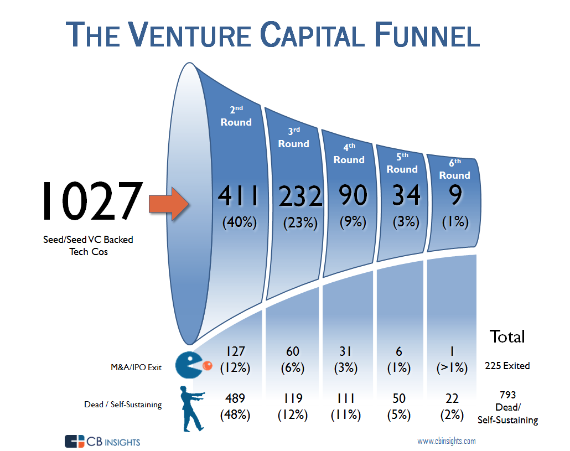
The venture capital funnel from CB Insights shows the average failure rates of venture-backed startups by financing round. Less than 2% of venture-backed startups ever reach unicorn status.


Neither exception suggests that your startup needs more trial subscribers. We all have a natural tendency to look at unicorns and glom on to their stories as validation for why we can do that.


According to CBInsights, your startup has a 1.28% chance of becoming a unicorn.


The one thing people forget when they hang their hat on the stories of unicorns is that these companies found product-market fit, had high levels of user engagement and most established clear sales funnels before they went off acquiring more free trial users.


Again, improve the product, the onboarding experience, and the sales funnel to convert more of your existing users.


If your customers love your product and rely on it to improve their daily workflow, they will serve as your fan club. Your engagement will skyrocket. You won't need to fudge community building or finding loyal users as word of mouth referrals come pouring in.


You can't force user engagement that doesn't exist.


Adopt The Customer Development Model


No marketer-no matter how good they are-can fix a broken product, such as one that few customers find valuable to their daily workflow.


Startups build a product or feature for the sake of building it, not on the basis of identifying their audience's thorny problems.


product-dev-model-1


Image Source


A second version of the product development model focuses on building the sales organization without ensuring that the product reaches product-market fit, which can lead to premature scaling.


If you've read Steve Blank's The Four Steps to the Epiphany, then you may remember reading about one of the following:


  • Premature scaling

  • The use of a product development methodology to measure sales and marketing activities

  • The pitfalls of getting the product launch wrong


Startups often go out of business because they rely on the product development methodology to measure all their sales and marketing efforts.


The product development methodology starts with building a product first and later engaging a sales and marketing team to push the product into the hands of the target customer, as opposed to building and iterating a product solution based on your target audience's needs.


customer-development-model


Image Source


The customer development model requires iteration through the customer discovery and customer validation stages until product-market fit has been achieved before acquiring more customers and scaling up.


In reality, they should use the customer development model and complement it with the product development model.


The customer development model involves iterating through the first two stages of customer discovery and customer validation until you reach product-market fit. Once you've reached product-market fit, then you can scale up, drawing more customers and building company infrastructure.


The customer development model helps ensure you don't scale up prematurely ahead of reaching product-market fit. As a result, your initial set of customers find your product so valuable that they can't help but recommend it to other companies.


Even in 2016, many startups still apply the archaic model of build first, validate last, or "build it and they will come."


Rather than apply the lean startup process, they develop a product no one cares enough to pay for. Worse, it doesn't even solve their target customer's pain points.


The Hubstaff Free Plan Mistake


Hubstaff-homepage-screenshot


Hubstaff, a startup for time tracking for remote teams, explained in its post SaaS Pricing: Our Big Free Plan Mistake why startups shouldn't feel implicit pressure to offer free trials to users and that user acquisition shouldn't be seen as a "money making arms race." They gave an insight glimpse into the reasons why free trials hurt most startups and why startups often rationalize them.


From their experience offering a free plan, they found that people take advantage of free accounts and that free users often skirt around the free account limits by signing up for multiple free accounts with different email addresses.


Even IP blocks can't solve this problem because customers have easy access to VPN software, like ExpressVPN.


Hubstaff also found that if someone values a product, they would pay for it.


If existing users aren't engaging with your product on a frequent recurring basis, then your product doesn't solve a hairy enough problem for the end user.


Two other takeaways:


  1. Free users tend to invite more free users

  2. Paid products carry more value in the consumer's eyes


I came across a blog post from ConversionXL that explains how not requiring credit card info during the free trial signup processes resulted in a lift to paid subscriber conversion rates.


It's important to take the company's business model in context relative to yours and assess whether that product is 10x better than a substitute.


If your product is easily replaceable or doesn't solve a big enough customer pain point, people will be less willing to pay for it.


Avoid acquiring more trial customers until your existing customers love engaging with your product every day and find it invaluable for their use case.


Get The CEO To Acquiesce


bigstock-hockey-stick-growth


If your startup is struggling to break even, convince the CEO to stop acquiring trial subscribers. Refocus your team's efforts on optimizing customer happiness with the right product feature set.


What are some factors that drive marketers to seek more trial subscribers?


  • Investors include a subscriber performance milestone with a liquidation preference in the equity agreement.

  • The C-Suite wants hockey stick growth so the company can raise additional capital at a higher valuation.


Even if marketers question the CEO or investor's judgment about trial user acquisition, it often doesn't change their minds. I've experienced it before. Founder CEOs can be pretty stubborn. Not because they don't mean well but it's often difficult for them to admit when their product isn't great.


As a result, the marketing team is forced to find more trial subscribers. It doesn't matter whether people actually find the product useful.


The venture-backed company CEO isn't worried about monetization in the short-run because "more trial subscribers" is the resolve for faster growth. This couldn't be further from the truth.


The truth is, you don't need more trial users...


... You need a product that solves a big need for your customer, not one that results from C-Suite groupthink.


If you care about your company and team, avoid letting your CEO put the company out of business. Sooner or later, your team will have to face the music and recognize that any underlying product engagement issues must be resolved first, or your team won't exist.


Customer Acquisition Cost and User Engagement are Inversely Proportional


Chart_Relationship_User_Engagment_v_CAC


The chart illustrates the inversely proportional relationship between Customer Acquisition Cost and user engagement shown as recurring site visits.


Customer acquisition cost, or the price you pay to attract a new customer, increases as user engagement decreases. To keep things simple, let's define user engagement as the number of recurring visits per unique user.


The cost of acquiring new customers goes down as word of mouth referrals increase.


Word of mouth customers tend to be much stickier than customers from other referral sources. So not only is it more expensive to acquire customers with fewer word of mouth referrals, non-word-of-mouth referral customers exhibit higher churn rates.


To confirm this, professors at three business schools teamed up to research the word-of-mouth effects in estimating customer lifetime value.


In short, they found that word-of-mouth referrals are more valuable than other types of referrals; their lifetime value is higher because customer churn is lower. Furthermore, customer acquisition costs are lower with higher word-of-mouth referrals.


Without high word-of-mouth referrals resulting from high user engagement and customer happiness, it becomes impossible to reach escape velocity, like Slack or Stripe.


On Virality


bigstock-Content-Virality-Concept


Virality can mask poor customer development.


Embedded viral loops are a misguided cure-all for chronically low word of mouth referrals.


Startups attempt to force trial subscriber acquisition with viral loops and other gimmicks. They hide any user engagement problems, providing an excuse for a product that doesn't solve its target customer's pain points.


One of my favorite quotes about virality comes from Laura Roeder's Observer article, Why I Don't Want My Startup to 'Go Viral':


"Word-of-mouth is like the stable, grown-up big brother of virality. Steady job, less impulsive, takes showers."


Weak User Engagement Is Killing Your Startup


Cohort_Analysis_-_Google_Analytics


With a few hundred or thousand existing trial subscribers, acquiring more trial subscribers is not the answer to unlock growth.


Your team's energy should be spent on customer discovery.


Install Kissmetrics and Hotjar. Collect as much data as possible about your trial users' in-app engagement. Setup custom reports in Google Analytics. Get serious about visitor and user segmentation.


Figure out why your users are not revisiting your site on a regular basis.


Here are some possible reasons why they aren't engaging with your application:


  • Is there a missing feature or capability that better addresses their daily workflow needs?

  • Are users getting stuck at a particular stage of the conversion funnel or onboarding process?

  • Do your transactional emails turn off subscribers, leading them to filter them out from their inbox with an email rule?

  • Is your site speed or data reporting causing subscribers to leave and never return?

  • Do users struggle to understand how your application works or what the benefits of using it are? Maybe they need better onboarding education or how-to help tutorials to learn how to use the interface as it applies to their specific use case.

  • Does the user interface cause visitors to flee the second they're inside the app?


Where To Go From Here


km-cohort-results-conversion-rate


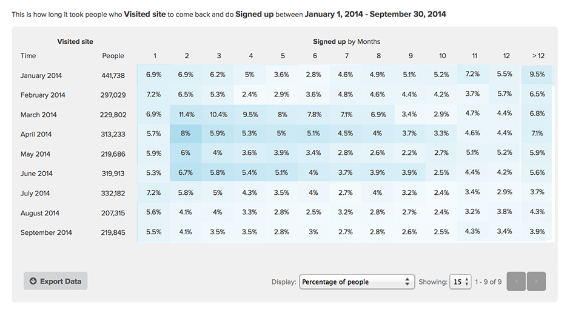
Diagnose poor user engagement with cohort analyses.


Segment cohorts by demography, geography, traffic source, landing page, exit page, cohort size (day, month, year), date range, device and more.


Make a short list, call up your trial users and ask them what their day-to-day struggles are.


Revisit your customer personas. Email them surveys. Do everything you can to understand what the fundamental challenges are in their daily workflow.


Incorporate this into your "user engagement benchmarking toolkit."


A couple ways marketers try to get trial users to engage with their platform:


  • Email users asking them to return but if the product doesn't provide much value, they'll struggle to convert them.

  • Incentivize customers to leave their trial early or try a myriad of other tactics to get them to convert.


At the end of the day, if they convert to paid customers for the wrong reasons, you will see high churn and refund rates. Conversion rates won't matter.


Conclusion


Most trial subscribers are tire kickers, never to return to your website.


If your startup has a few 100 or 1,000 unconverted trial subscribers, your team should spend less time finding new ones. Focus on improving user engagement. Develop the right product feature set that solves your users' biggest workflow challenges.


That's what Edgar did off the bat. With their queue feature, small businesses and bloggers no longer waste social media updates. Their auto-refilling queue frees up their customers' time that was otherwise wasted.


Build one invaluable product feature that solves a big problem for your existing customers. Avoid wasting time and capital acquiring trial users to mask weak organic growth.


Address user engagement issues before going on a shopping spree for more trial users.


About the Author: Cody Lister is the founder of MarketDoc, a blog and digital marketing agency that optimizes pay per click advertising campaigns for high return on ad spend from search and social media. Grab his free user engagement checklist and get step-by-step marketing formulas, case studies and insights for explosive startup growth. Follow him on Twitter.


Tuesday, February 9, 2016

5 Essentials for Building a Lucrative Ecommerce Site

The business opportunities online are enormous but taking advantage of them is a painstaking process.


Monday, February 1, 2016

11 Practical Tips for Finishing Your To-Do List Faster

cross-off-to-do-list-faster.jpeg


"Work smarter, not harder."


Chances are, you've heard this phrase before -- and probably more than once. The philosophy behind working "smart" is to maximize your productivity when you are working so that you can get more stuff done in shorter periods of time. By working smarter, you'll find yourself with more time in the day to sleep, exercise, be creative, and recharge.


(Oh, and it just so happens that those relaxing things also make you more productive when you get back to work again -- and so the cycle continues.)


Most of us use to-do lists to keep track of what we need to do and how much we've gotten done. These lists are loose ways of measuring how productive we are: When we've successfully crossed everything off our list, we feel really really accomplished.


The key to getting through your to-do list faster is by working smarter -- without sacrificing the quality of your work. How is that done? Here are 11 tips to help you get through that to-do list as efficiently as possible.


11 Tips for Getting Through Your To-Do List Faster


1) Choose the to-do list app or tool that works for you.


Don't get me wrong: I'm a big fan of good ol' pen-and-paper to-do lists. But unless you want to carry a physical notebook around everywhere you go, it makes sense to use a to-do list app or tool that syncs across all your devices. That way, you can access your to-do items whenever and wherever you need to, whether you're at your desk, in a meeting, or on a business trip.


There are a lot of to-do list apps and tools out there, though ... so which ones are the best of the best?


Actually, the best one for you depends entirely on your working style and personal preferences. Here's a list of 10 of the best to-do list tools and apps. It includes descriptions of how they work and which features they include so you can choose the one(s) that fit closest with your style.


2) Write out your to-do list the day before.


When you plan out what you're going to do the day before, a few good things happen.


For one, you'll be able to dive right into your to-do list in the morning, freeing you up to get more done during one of the most productive times of day.


Secondly, planning out your day in advance can help you spot obstacles ahead of time, which can help you reduce the total time you spend working on a project.


Finally, knowing what you have going on well in advance could help you relax and sleep better the night before -- and a good night's sleep is important not only for productivity but also for health and happiness.


Before you head home from work each day, spend a few minutes looking over your calendar for the next day and writing a to-do list -- perhaps using that new favorite to-do list app or tool.


3) Separate your work and personal to-do lists.


When you're in the office, you shouldn't be worrying about cleaning the oven, feeding your chinchilla, or picking up a birthday card for your mom. Likewise, when you're at home, you should do your best to unplug and be present in the moment -- without worrying about those looming work deadlines. We all know there's always more you could be doing, but you'll be happier and more productive if you focus on work when you're at work and on life stuff when you're at home.


The simplest way to separate your work and personal to-do lists is by keeping multiple lists separated on the same tools or apps. Or if you find it hard to stay focused on one or the other when they share an app or tool, you might use different tools or apps for each part of your life.


I personally keep three separate lists in three locations: My personal to-do list is in my written planner, my grocery and packing lists are on my phone in the Wunderlist app, and all my work to-do's are on my computer in the Todoist desktop app. Find the system that works for you.


4) Keep a "to-don't" list.


Here's a productivity trick that'll help you focus on what really matters: Remove any items from your to-do list that you're not realistically going to do and put them on a "to-don't" list. That way, you aren't wasting any time on the things that don't really matter. This'll help you prioritize the more urgent list items and get through everything faster.


What's more, you'll probably feel less stressed overall without those less important things hanging over your head. I'll always remember what Arianna Huffington said in her keynote at INBOUND 2014:


'I discovered early on in life that you can actually complete a project by dropping it,' she said. And this has been incredibly useful to me. For example, I thought that I was going to learn German. I thought I was going to become a good skier. I thought I was going to learn to cook. And one day, I decided I was actually never going to do any of these things. So I dropped them ... You just have to decide, what are you going to put your energy into and what you're not going to put your energy into, and that's just as valuable."



Below is a helpful graphic from my colleague Leslie Ye on how to create a "to-don't" list:


to-dont-list-infographic.jpeg


5) Stay accountable by sharing your to-do list.


Not only is sharing your to-do list with colleagues a great way to collaborate, but it's also a great way to hold yourself accountable. Having to share your to-do list with others in the first place will force you to spend some time prioritizing your tasks and thinking through which ones you'll be able to realistically complete. You might find that when it comes to actually knocking them off the list, you'll feel healthy pressure to get everything done in the time period you promised.


There are a lot of different ways to share your to-do list with your colleagues. Here at HubSpot, the blogging team has a daily standup where we come together briefly in the mornings to, among other things, list out what we're working on that day. If we find ourselves repeating the same task over a series of consecutive days, it becomes clear to ourselves and our colleagues that we either need to prioritize that task to get it done, or reevaluate whether it really needs doing in the first place. You can also use collaborative to-do list apps like Trello or Wunderlist to share tasks with others digitally.


6) Block time on your calendar to knock things off the list.


When you literally reserve blocks of time in your online calendar to get specific tasks done, it can be much easier to focus and get your work done quicker. Plus, it prevents others from setting up meetings with you during that time. Need to do some last-minute prep for a presentation at 4 p.m.? Block off a 1-2 hours in the morning or after lunch so no one bothers you during that time. Need to do some research before an important call? Block the half hour before the call starts.


Even if you don't have a specific project you want to tackle, you can still block off time to cross things off your to-do list. HubSpot's Director of Marketing Debbie Farese told me once that she blocks time off on her calendar and labels it "GSD" (Get S*** Done) so she can work for longer stretches without getting disturbed.


7) Batch similar tasks in the same time frame.


Ever been doing online research one minute, and find yourself writing a one-off email another? Perpetually shifting your focus like that can add up to a whole lot of wasted time. In fact, a study by the American Psychological Association found that shifting between tasks causes temporary mental barriers, depleting our productivity by as much as 40%.


Instead of completing tasks as they come up, consider doing batch tasking, or batch processing. This is a handy time management hack in which you take similar tasks -- like answering email, scheduling out your tweets, and so on -- and "batch" them together to get them done faster. For example, you might set aside a full hour each morning to read and write emails. Or, perhaps you dedicate your Friday mornings to writing blog posts.


HubSpot VP of Growth Brian Balfour once said he thinks the worst habit people have is not batching their emails. He typically batches email twice per day: first between 11 a.m. and 12 p.m., and then between 4 p.m. and 5 p.m.


email-batching-periods.png


Over the next few days, pay attention to the tasks you find yourself doing on a one-off basis that could be hurting your overall productivity and consider batching these tasks.


8) Physically remove distractions.


Speaking of losing precious productivity when you shift your focus, distractions like notifications, phone calls, and noise in the office can make it much harder to get through your to-do list quickly. Gloria Mark of the University of California, Irvine found that a typical office worker gets only about 11 minutes of work done between each interruption, while it takes an average of 25 minutes to return to the original task after an interruption.


There's only so much you can do mentally to close yourself off from these distractions. When you see a Facebook notification pop up telling you your friend just posted a new video to your Timeline, how are you not going to look? Remove those temptations by physically removing stuff like notifications (for email, for Chrome, and so on), turning your phone on airplane mode, or even putting your phone in your bag except when you're taking a break.


If you really need to focus, you might even move yourself to shut out in-person distractions. HubSpot Demand Generation Manager Amanda Sibley told me, "If there is something I must get done in a day -- a deck due to our CMO, for example -- then I turn off email and shut myself in a room for an hour or so until it's done."


9) Work in sprints, follow by periods of rest.


Similar to batching similar tasks together, doing work in regular intervals with breaks in between is another way to check more off your to-do list, faster. There are several sprint-and-rest techniques out there, but the Pomodoro Technique is a favorite of ours. It's a productivity-boosting technique developed by neuroscientists that can help you concentrate for longer periods, avoid distractions, maintain higher energy throughout the day, and lower your stress levels.


The Pomodoro Technique is all about taking advantage of our natural rhythms of energy and fatigue. Here's how it works: You work in 90-minute intervals, followed by 30 minutes of rest between each interval. Why? These time frames are based off our ultradian rhythms, which are the 120-minute biological intervals our bodies operate on throughout a given day. These 120-minute intervals are broken into a series of peaks, when we're feeling energized, and troughs, when we're feeling fatigued.


ultradian-rhythm.png


When you work in 90-minute intervals, you're working when your energy is highest, and resting when your energy is low so you can recharge and get back to being productive.


pomodoro-technique-hubspot.png


The point here is to not fight the times of day when we naturally feel exhausted. Instead of working against our bodies by loading up with caffeine, eating sugar foods, or just simply "biting the bullet" and working through the fatigue, we're working with our bodies to take rests when we need them.


You can keep track of the time by just keeping an eye on the clock, but if you prefer to use a desktop timer, my colleague Scott Tousley suggests using Pomodoro One for Mac or Tomighty for Windows. It's as easy as pressing start and stop.


pomodoro-screenshot.png


10) Reward yourself for completing tasks.


If the break alone isn't enough to keep you laser-focused during periods of work, try using a rewards system. Once you knock three items off your list, or once you finish a particularly grueling task, you can allow yourself to check Twitter, eat a snack, or go to the gym.


Sometimes, I plan a break with coworker where we agree to grab coffee together once we're done with a task on each of our lists. It's a less direct way of keeping each other accountable than standup or sharing our to-do lists, and the reward -- a nice break with a friend -- is much sweeter.


11) Try the "dead battery countdown."


Here's a handy productivity trick from my colleague Ginny Soskey, who manages HubSpot's Marketing Blog. Bring your laptop with you to a remote location without your computer charger, and aim to get your to-do list done by the time you leave. This is a way of gamifying your productivity, and it works: The pressure of a looming deadline can do wonders to keep you focused and working smarter.


What tips do you have for getting through your to-do list? Share with us in the comments.


free productivity tips


Monday, November 30, 2015

Why You Should Invest In Inbound Marketing Before CRM Implementation

chicken-or-egg.jpg

Since the beginning of time, humanity has sought to answer unanswerable questions, like which came first, the chicken or the egg? Recently, I’ve come across a question with increasing frequency, that may not be as significant, but is probably even more important if you’re looking to embark upon a journey of accelerated sales growth.

What should you focus on first, building an effective inbound marketing/lead generation process or implementing a CRM to manage your sales and customer acquisition process? While both are important, the question is should you focus on one before the other?

To be clear, both are very important to making growth predictable, sustainable and scalable. If you have the resources and bandwidth you should be pursuing and enhancing both of them simultaneously. However, if you must choose between them, the decision you make will have a significant impact on your growth outlook.

Before answering the question, let’s take a look at the fundamental purpose of each initiative.

The Purpose of CRM

There are several advantages of an effective CRM system with the primary purposes being:

  • Building sales efficiency
  • Providing management insight into the status and progress of the overall sales effort
  • Ensuring compliance with the sales process
  • Providing clear reporting
  • Creating greater predictability throughout the entire sales process

The Purpose of an Inbound Marketing Program

Here too, there are lots of reasons you’d want to embark on an inbound marketing effort, with the primary purposes being:

  • Generating greater awareness and engagement with your desired markets
  • Standing out from your competition by creating and reinforcing relevant thought leadership
  • Increasing lead velocity and generating more sales qualified opportunities for the organization

To reiterate, all of these results are very important, but I think it’s pretty clear which initiative should be focused on first. That is Inbound Marketing.

3 Reasons Why You Should Focus on Inbound Efforts First

1) CRM Doesn’t Fix Bad Processes, But Inbound Can

An effective CRM system provides tremendous value in increasing the efficiency of a good process. However, it does nothing to address an average or poor process.

For more than 20 years I’ve been working with companies looking to improve their results through CRM utilization. All too frequently significant investments are made in software, time is spent training on the system and absolutely nothing changes. The initial reaction is to blame it on bad CRM, when the reality is that it’s bad process that is the real culprit. Designing a CRM system effectively requires that you have a clear and effective demand generation process that can be mapped to the CRM.

While working on the CRM does little to address bad sales process, the process of implementing an inbound marketing approach does a tremendous amount to improve your sales process (and thus your CRM efforts).

Inbound marketing requires that you start at the top of the funnel and work your way through to the bottom. It makes you view demand and revenue generation from a holistic viewpoint, to understand your market better and to align your sales efforts to how your market behaves today. All of these things drive greater revenue opportunities and create the path to gain the very efficiencies that CRMs promise to create.

2) Effective Inbound Methodology Creates Better CRM Application

I deal with a lot of companies that have been using CRM for years. It is a rare event for me to come across someone who has either designed or implemented their CRM effectively. The data is, to put it bluntly, 90% crap.

A tremendous amount of the value you get from using a CRM comes from the ability to slice and dice the data to segment effectively and increase personalization. However, if you haven’t done the basic work of defining your buyer personas, designing the message to enable you to personalize and to determine how you are going to effectively nurture, you won’t have the clarity to use your CRM effectively.

In my experience, effective CRM reinforces an effective inbound marketing and sales approach, it does not create one. I’ve lost count of the number of times a client has had to substantially change their CRM as a result of the creation of an effective inbound marketing strategy.

3) You Cannot Have Predictable Growth Without Predictable Lead Generation

If I were to summarize the two most valuable benefits of a CRM it would be predictability and efficiency. As I’ve shared, inbound marketing creates the environment for an efficient process, but what about creating predictability?

Simply put, you cannot have predictable sales results or predictable growth if you do not first have predictable lead generation. While creating an effective lead generation strategy certainly involves more than just inbound marketing, inbound is a crucial component.

Inbound marketing enables you to build a true funnel that allows you to build a predictable pipeline for growth. Consider the following:

The natural focus of building engagement that is created by fully adopting an inbound marketing approach builds a more efficient and effective sales process and make CRM adoption a much easier, more profitable effort.

Additionally, a major benefit of inbound marketing is that it creates revenue. No matter how you slice it, CRM is a cost (a valuable one, but a cost nonetheless). Building an effective revenue generation process creates the environment that allows efficiency and predictability to be sustainable.

Investing the time, money and energy into inbound marketing first, puts you in a stronger position to both implement an effective CRM initiative and to accelerate growth.

New Call-to-action

Wednesday, November 18, 2015

How to Remove Render-Blocking JavaScript From Your Website

Have you ever finished creating a website and loved everything about it? And then promptly began to hate it after attempting to actually view it online and it is painfully slow to load? Everyone is used to the common culprits, but there is one often overlooked perpetrator: render-blocking JavaScript.

So now you are asking, what is render-blocking JavaScript? If we breakdown the phrase "render-blocking" into its parts we get render (to load) and blocking (to prevent); so we can deduce that this refers to JavaScript that is preventing a page from loading. JavaScript is awesome; it helps to add visually appealing elements to improve on the user experience on your website but it can also be a huge time hog.

Time hogging is not only a nuisance for your visitors; it can also cost you significantly when it comes time for Google to show your site organically. Since 2010, Google algorithms account for loading speed in ranking decisions. And since most other culprits are already discussed extensively today we will be focusing on how to remove render-blocking JavaScript from your website.

1) Identify

The first step in the process is to identify the offending JavaScript. One of the simplest ways to do this is to use PageSpeed Insights; this Google tool quickly displays a list of the precise files that are currently render-blocking a particular page and which are located above-the-fold. Above the fold is everything that will show up first on a visitor’s screen. This means that if a JavaScript feature does not occur as soon as the visitor loads the page then it should not be included in the header of the webpage. (More details about this in Step 2.)

Clicking on the “Show how to fix” link will expand the view and show you the list of script resources that should be evaluated.

PageSpeed Screenshot

The most commonly used JavaScript is JQuery, so you will likely see this one show up most often.

PageSpeed Screenshot 2

2) Choose Best Method

Once you’ve identified which scripts need to be moved it is time to decide “how” to fix them. There are two main methods to choose from. The first is to make the scripts inlined; in this method the contents of the script are added directly into the HTML of the page and are only loaded once they are needed. This is the best option if the script is small and applies to a single page.

Another option is to defer the script. When you defer JavaScript you are delaying any non-essential scripts from loading until after the first render or until after the more essential portions have loaded. This method is best when the script is not crucial and can wait to load.

3) Decide Where to Move It

We are now ready to apply your newly chosen technique within the site. With either option we will be removing the JavaScript from the head and adding it into individual sections of the HTML. Finding your website's header will depend on which CMS you are using. Often you will be able to find it in the overall page settings, or in cases like WordPress you might have to look in the "Theme Options" page or a header.php file in the editor (see images below.) It is important note that you should NOT make changes in the header.php file unless you are an advanced user, otherwise you risk creating unnecessary errors to your site!

In HubSpot we can find the head HTML in both the template view and in the page editing “options” tab.

From the template view you can find the “Edit Head” option in the Edit dropdown:

template view

We will go from something like the example below to moving the entire script into your body html, relevant php file (WordPress,) a Custom HTML module (HubSpot) or into the footer to delay the rendering.

JavaSscript Head

Body HTML

The body HTML is where you have all of the content for your pages. The best way to find it is to find where you have all of the copy for your content. If you are using WordPress, the script can be added directly to the page by typing it alongside your content via the "Text" view.

Custom HTML Module

To add the script to a page in HubSpot, we need to use a Custom HTML module. The Custom HTML module is accessed via the template view.

custom html module screenshot

Footer

Meanwhile, finding the footer of your site should be very similar to finding the script in the head tag. This could be in the overall website/page settings; if you are using WordPress, look for a "Footer" tab in the "Theme Options" or for the footer.php file in the Editor (same note applies here, do not make changes unless you are an advanced user!)
In HubSpot, it is found in the edit page view “Options” tab
page edit screenshot
footer script edit screenshot

Where you move the script will depend on if the script needs to occur at a certain point of the page or if it can wait until the end of the page rendering. The first should go in the body HTML or Custom HTML module while the latter can go into the Footer section.

4) Move the Script

This next step is pretty simple; add the script to your desired location.

custom html screenshot

post footer edit screenshot

5) Test

This is one of the most important steps in this process.

After making all the changes check the previews to make sure that the site still works. Does the page load correctly? Are all elements showing properly? If there is something broken, or not loading properly, then you should troubleshoot the problem. This can be done with the help of many differentdeveloper tools; try a few out and then choose your favorites. Once you find the errors, double check your code and verify that you are not missing any important components such as semicolons or curly braces.

6) Publish

Once you have confirmed there are no issues with the page after the changes are applied, you are then ready to publish.

Conclusion

Now that you have removed the render-blocking JavaScript you should continue to optimize your website’s speed by analyzing other features that are known to slowdown performance.

To take this premise even further, regularly testing the speed of client websites is something which should be a common occurrence in any web development schedule. With the ever evolving world of online marketing staying ahead of any potential issues is critical to success.

CTA-FindACure-v2